O
Morning digest
We connect to your systems and learn how the shop actually works. Then we deploy multiple governed agents. This is not another Copilot seat or a DIY agent experiment.
Built for owners and ops leads in trades, insurance, manufacturing, logistics, HVAC, and restaurants. Private beta.
Morning digest, already posted.
OpsRev posts the morning digest before anyone asks for it.
Work in OpsRev Chat, or bring your AI teammate into Slack, Teams, Google Chat, email, and the channels your team already uses.
The hard part is not opening a chat window. It is connecting the right systems, making work repeatable, scoping access, monitoring failures, and improving the teammate as your business changes.
OpsRev helps you through each step so AI becomes a governed operating layer, not another tool your team has to manage alone.
We connect the teammate to your CRM, inbox, files, accounting, portals, and line-of-business tools without replacing the systems that own the data.
Your workflow becomes a versioned skill with defined inputs, steps, outputs, approvals, and escalation paths, not a pile of fragile prompts.
Permissions, approval gates, deterministic checks, and audit trails keep the teammate inside the lane where it should operate.
We monitor workflow runs, create issues, patch skills, and deploy improvements as your systems and operating goals change.
Reporting, review meetings, roadmap decisions, and new-skill development keep the teammate aligned with what the business needs next.
OpsRev can turn recurring work into a secure, permanent Client App with the exact list views, records, filters, and actions your team needs. Your CRM, accounting, and field systems stay in charge of the data; we add the operating surface they never gave you.
Explore OpsRev Client AppsFlorida roofing is serious business: storms, permitting, compliance, inspections, insurance documentation, crews, and customers all move at once. This organization needed faster approvals and cleaner pipeline execution without adding another back-office bottleneck.
After OpsRev went live across job records, estimate documentation, follow-up, and reporting workflows, the long tail of stalled work disappeared in the post-launch cohort.
Anonymized analysis of 6,631 AccuLynx jobs before and after launch.
View detailsCRM updates, POS exports, accounting cleanup, loyalty data, follow-up emails, document assembly, data entry — your best people are buried in operational grind instead of doing the work that actually moves the needle.
Catering leads, estimate requests, sales opportunities, and open customer issues sit for days without a response. By then, the customer has already called a competitor. Revenue bleeds out silently.
Your team spends hours every day moving data between systems — POS, CRM, accounting, loyalty, vendor portals, spreadsheets, and email. That's not their job. It's a process failure.
Every new location, acquisition, service line, or busy season creates more reconciliation, reporting, handoffs, and follow-up. Revenue scales but admin overhead scales right with it — eating your margins.
OpsRev is strongest when revenue, operations, finance, and customer teams all depend on the same information but live in different tools.
Estimates, sales kits, CRM updates, measurement data, invoices, and customer follow-up handled across the tools your team already uses.
HospitalityPOS, accounting, loyalty, catering sales, vendor invoices, and store operations connected so finance and operators see the same reality.
Commercial TradesBid documents, compliance checks, scope packages, and change-order workflows assembled without adding back-office headcount.
Commercial HVACQuote support, product data, submittals, service coordination, and data-center project follow-up automated across your existing tools.
The exact mix depends on the operation. In practice, our best deployments create leverage across the recurring admin roles that sit between sales, finance, customer service, and operations.
Updates job records, tracks estimates, assembles sales kits, and keeps follow-up moving without forcing reps back into admin mode.
Compares POS sales, deposits, delivery payouts, vendor invoices, and accounting categories before month-end cleanup piles up.
Monitors inbound catering leads, drafts responses, updates sales records, and alerts the team when opportunities go stale.
Prepares bid packages, moves takeoff data, checks scope details, and stages proposal documents for estimator review.
Triage quote requests, gather product and submittal data, stage CRM updates, and keep data-center project follow-up from living in inboxes.
Turns quote and customer data into ERP-ready orders, checks fields, and flags missing pricing, BOM, or inventory context.
Handles routine portal updates, document requests, status checks, and exception alerts so producers and operators stay focused.
Extracts lease details, updates property records, prepares report inputs, and flags critical dates before they become misses.
Choose OpsRev Chat for a dedicated workspace with your AI teammates, or keep working in Slack, Teams, Google Chat, email, and text threads. We connect the chosen channels to Office 365, Google Drive, Notion, Salesforce, your CRM, accounting, and operations systems. Your existing systems stay in place.
We deploy autonomous AI teammates directly into the channels your team already uses and connect them to the systems your business already runs on. When a recurring workflow needs a screen, we add a purpose-built app without replacing the underlying systems of record.
We connect to your channels, email, files, CRM, accounting, and ops tools. Map your fields, business rules, approvals, and handoffs.
Your AI teammate watches how your team works for 1–2 weeks. It learns your process, terminology, systems, exceptions, and escalation paths. Zero disruption.
System updates, reconciliation checks, follow-up sequences, and document assembly go live. Your team sees the work inside the channels they already use.
Full autonomous operations. Follow-up enforcement, stale-work scans, exception alerts, and process governance run 24/7 with visibility in your team channel.
The hard part of any AI teammate is capturing how the work actually gets done. We make it easy: your team records and narrates a task with our desktop app — no interview calls, no lengthy walkthroughs. OpsRev's AI turns each recording into a step-by-step SOP and a map of the systems you touch, then scopes the skills and integrations your teammate needs.
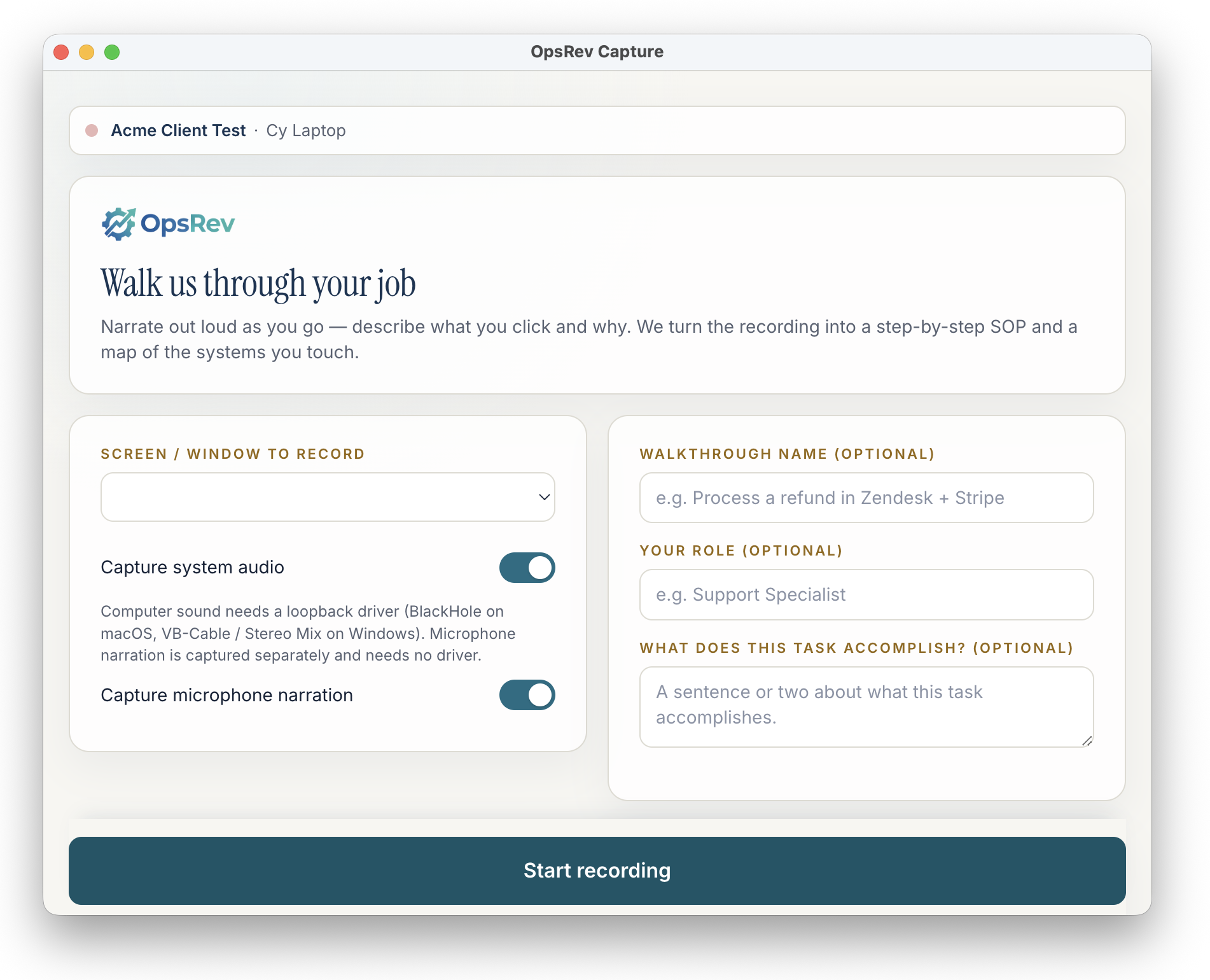
Your people focus on revenue-generating work. Your AI teammates handle the operational grind and keep leadership informed.
Monitors every inbound lead, catering request, estimate, ticket, and open customer issue. Automated reminders, system tasks, and team alerts when anything goes untouched.
Regular scans flag stale leads, dead estimates, unreconciled orders, neglected tasks, and missing handoffs so your operating reports reflect reality.
Analyzes customer calls, meetings, store check-ins, and operational notes for quality, completeness, and follow-through. Scales accountability across the business.
After every call, meeting, order inquiry, or operational issue, your AI teammate drafts follow-ups, updates the right system, and creates next-step tasks.
Auto-generated briefings combining CRM history, account context, sales activity, loyalty behavior, open issues, and relevant notes. Delivered before every meeting or site visit.
See a real exampleProposals, estimates, catering summaries, invoice packets, finance reports, and exception lists assembled from real system data.
When the only way in is a website, your teammate opens its own browser and does the work: reorders, status checks, downloads from vendor dashboards. You approve the logins and can take over at any time.
Watch the one-minute videoWhen output is too rich for chat, your teammate publishes a live interactive page — dashboards, calculators, reports — at a stable link. Private to your team, shareable when you say so.
Try two live artifactsWhen the work is recurring, your teammate gets a permanent application with the exact list views, records, filters, and actions your team needs. Your CRM, ERP, or field platform stays the system of record.
Explore Client AppsNo prompting. No templates. OpsRev detects the work ahead and delivers the context your team needs into the channel they already use: account history, open issues, system status, customer context, and talking points. Ready before the day starts.
No rip-and-replace. Built around your existing stack.
We map the stack and where ops hours leak. We connect systems and learn the procedures. After that we deploy multiple agents. This is not a one-agent pilot.
Map stack, handoffs, where ops hours leak.
We connect to your systems and learn how the shop actually works.
We put multiple governed agents on the work.
More agents later, under the same controls.
We'll map your stack, handoffs, and where ops hours leak. Then we'll say what managed AI teammates would take on first. No seat pitch. No one-agent pilot.
Private beta. Read-only where possible. We only claim what we’ve proven.

Ivy
OpsRev assistant · online