New · OpsRev Capture

Get the knowledge out of your team and into an agent.

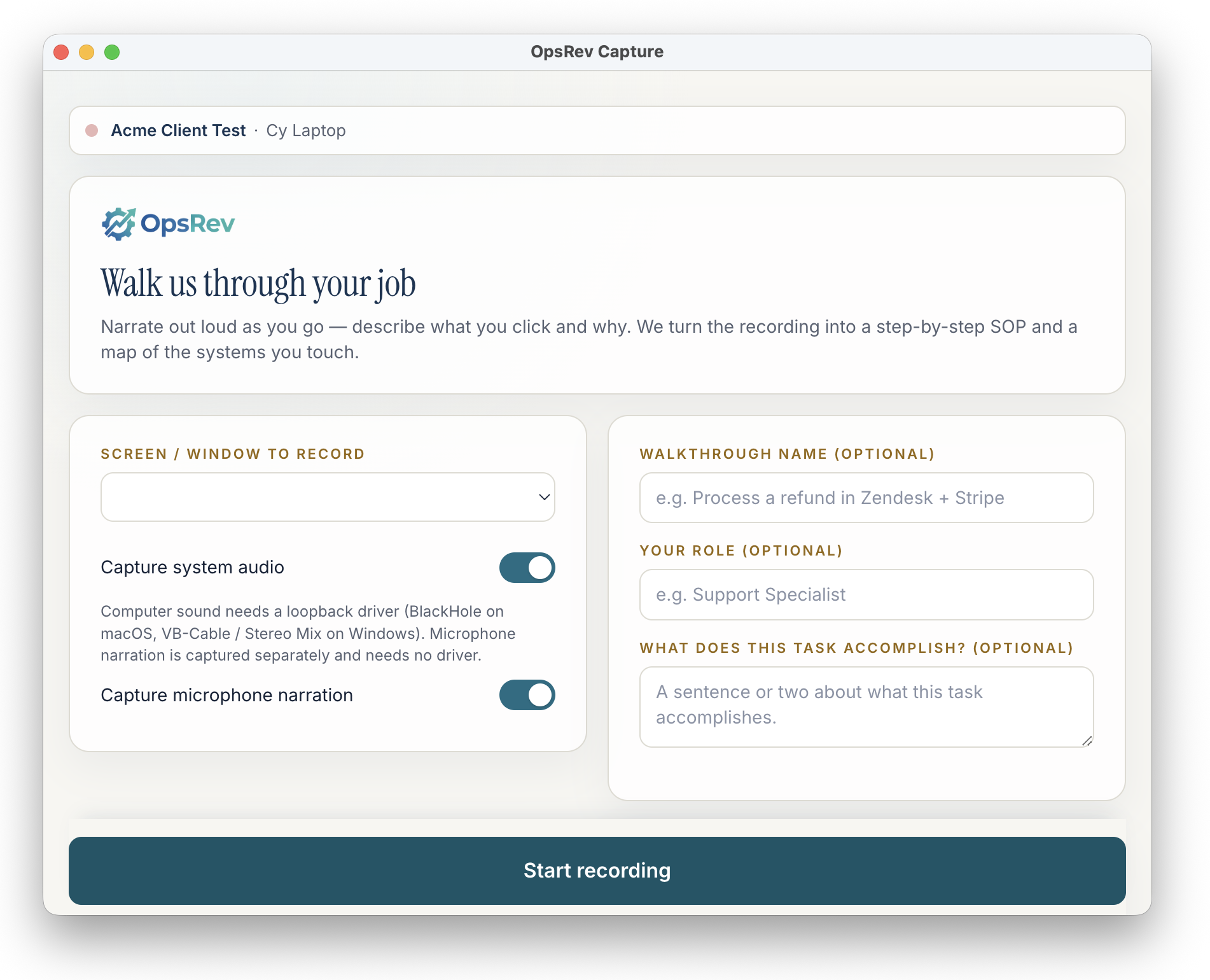
OpsRev Capture is a desktop app your team uses to record and narrate how the work actually gets done. We turn each recording into a step-by-step SOP and a map of the systems you touch — then scope the skills and integrations your digital teammate needs. No interview calls. No walkthroughs to coordinate.

macOS · Apple Silicon (M-series) · v0.1.0 · ~97 MB. Windows coming soon.

OpsRev Capture desktop app showing the 'Walk us through your job' recording setup screen
Why it matters

Your best processes live in people's heads.

The hardest part of standing up a digital teammate has always been extracting how the work really gets done. Capture removes the coordination tax — your team shows us instead of telling us in a meeting.

The old way

  • Schedule interview calls across busy calendars
  • Pull people off real work for walkthroughs
  • Write process docs that go stale immediately
  • Re-interview when something was missed
  • Weeks of back-and-forth before anything ships

With Capture

  • Record the work whenever it actually happens
  • No coordination — narrate while you do the job
  • Recording + narration is the source of truth
  • AI catches the systems and steps automatically
  • A scoped skill in days, not months
How It Works

Record once. We do the rest.

Capture records screen video, system audio, your spoken narration, and the clicks, scrolls, and keystrokes behind the work — plus the step markers you press as you go.

STEP 01

Install & start recording

Download OpsRev Capture, pick the screen or window you want to record, and hit Start. Toggle system audio and microphone narration on or off — no meeting to schedule.

STEP 02

Narrate as you work

Do the job the way you always do it and talk out loud — what you click, why you click it, and the rules in your head. Drop a step marker whenever a new step begins.

STEP 03

OpsRev analyzes it

On stop, the recording, narration, and on-screen actions upload securely. Our AI distills a step-by-step SOP and a map of every system the work touches.

STEP 04

Your agent gets the skill

We scope the skills, integrations, and guardrails from what you recorded and build them into your OpsRev digital teammate — no interview marathon required.

From one recording

One walkthrough becomes everything we need.

A single narrated recording gives the OpsRev team enough to scope and build a real skill for your digital teammate.

Step-by-step SOP

A clean, ordered procedure of exactly how the task gets done — anchored to the step markers and narration from the recording.

System & integration map

Every tool the work touches — CRM, email, docs, accounting, portals, spreadsheets — and how data moves between them.

Scoped skills

The concrete skills your digital teammate needs to take the work on, framed around your terminology, accounts, and approvals.

Edge cases & exceptions

The judgment calls and "it depends" moments your team narrates out loud — captured so the agent handles them the way you would.

You stay in control

Nothing is recorded until you press record.

Capture only runs when your team chooses to record a specific task. You pick the screen or window, decide whether to include system audio and mic narration, and review before anything is sent. Recordings upload securely into your OpsRev workspace — not a public destination.

Per-task, opt-in

You choose exactly which task and which window to record. It is not an always-on monitor.

Your workspace only

Each device is enrolled to your client workspace; uploads land in your secure OpsRev storage.

Narration is optional

System audio and microphone narration are independent toggles you set before each recording.

Signed & notarized

The macOS build is code-signed and notarized by Apple, so it installs cleanly on Apple Silicon.

Download

Install OpsRev Capture

Built for Apple Silicon Macs (M-series) and ready today. Windows is on the way.

macOS

macOS · Apple Silicon (M-series)

Ready
Download .dmg

v0.1.0 · ~97 MB · Apple-notarized

Install

  1. 1. Open the downloaded .dmg and drag OpsRev Capture to Applications.
  2. 2. Launch it and grant Screen Recording & Microphone permissions when prompted.
  3. 3. Enroll the device with the link OpsRev sends you, then start your first walkthrough.

Windows

Windows 10 / 11

Coming soon

Want the Windows build the moment it ships? Tell us and we will let you know.

On an Intel Mac or PC today?

No problem — OpsRev can still capture your processes with us directly. Reach out and we will arrange the best option for your setup.

Turn how your team works
into a teammate that does it.

Capture is how OpsRev gets the knowledge out of your team and into an agent — fast. Not an OpsRev customer yet? Start with a free ops assessment and we will show you where a digital teammate pays off first.